Overview
The VR CAD Viewer is a Qt-based application that allows users to load, visualise, and interact with 3D CAD models.
The system integrates VTK for rendering and OpenVR to provide immersive virtual reality functionality.
This project demonstrates the use of software engineering principles to build an interactive graphical application with real-time 3D and VR capabilities.
---
Key Features
- Load and display multiple CAD models (STL format)
- Tree-based structure for managing model parts
- Modify model properties (colour and visibility)
- Apply visual filters (e.g. clipping, shrinking)
- Real-time rendering using VTK
- VR mode for immersive model interaction
---
System Architecture
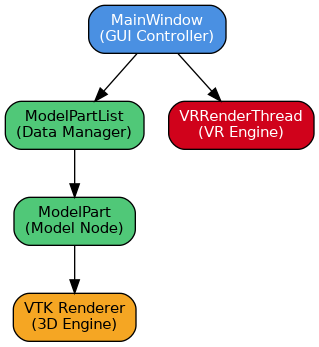
The application follows a modular design:
- MainWindow → Handles GUI and user interaction
- ModelPart / ModelPartList → Manage model hierarchy and data
- VTK Renderer → Handles 3D visualisation
- VRRenderThread → Runs VR rendering in a separate thread
This separation improves maintainability and performance.
---
System Architecture Diagram
Installation
To run the application:
1. Download the installer from the GitHub Releases page
2. Install required dependencies (Qt, VTK, OpenVR if needed)
3. Launch the application executable
---
Usage
1. Open the application
2. Load a CAD model (File → Open)
3. Select parts from the tree view
4. Modify properties (colour/visibility)
5. Click **Start VR** to enter VR mode
---
Technologies Used
- Qt – Graphical User Interface (GUI)
- VTK (Visualization Toolkit) – 3D rendering engine
- OpenVR – Virtual reality integration
- C++ – Core application development
---
Future Improvements
- Support for additional CAD file formats
- Improved VR interaction controls
- Performance optimisation for large models
- Enhanced UI/UX design
---
Team Members
- Bruce
- Simon
- James
- Priya
---
## Documentation
This website was generated automatically using **Doxygen** from the project source code.